QUESTION
I would like to turn off the display of Floor 0, my foundation level, so that I don't see it in my cross section/elevation views. How can I do this?
ANSWER
You can control the display of foundation walls, slabs, curbs, piers and footings in the Layer Display Options dialog or Active Layer Display Options side window.
- Foundation walls, including grade beams, slab footings and garage curbs, are placed on the “Walls, Foundation” layer by default.
- Footings under slab footings and foundation walls are placed on the “Footings” layer by default, as are foundation piers.
- Post footings and deck post footings are placed on the “Footings, Post” and “Footings, Deck Post” layers by default.
- Slabs created using the Slab tools are placed on the “Slabs” layer by default.
- Wall labels and slab labels are placed on the “Walls, Labels” and “Polylines 3D, Labels” layers, respectively.
- The “Foundations” layer controls the display of all objects on Floor 0 in camera views but does not affect floor plan view.
To toggle the display of the foundation in an elevation view
- With your cross section/elevation view active, select Tools> Layer Settings> Display Options
 or access the Active Layer Display Options
  side window.
- Scroll down to the "Foundation" layer and remove the checkmark from either the Disp column or the Display checkbox.
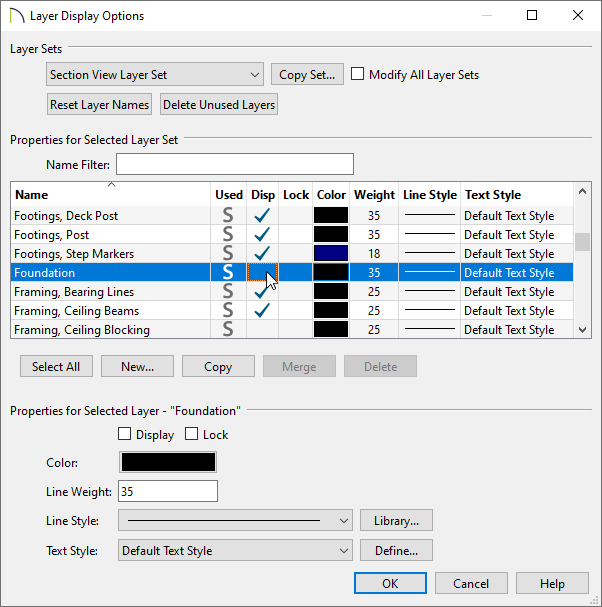
- Click OK to apply the change.
Cross section/elevations can also be clipped to limit what you see in the view. To learn more, please see the "Clipping Cross Section/Elevation Views" resource located in the Related Articles section below.
