QUESTION
I would like to have a dimension string in my plan display both metric and imperial units at the same. How can I accomplish this task?
ANSWER
Both imperial and metric units can be displayed for dimensions by utilizing the Primary and Secondary Format options. You can specify an individual dimension line to display both units of measurement, or you can setup your Dimension Defaults so that all dimension lines in your plan display both units of measurement.
To modify an individual dimension line
- Using the Select Objects
 tool, select the dimension line you'd like to modify, then click the Open Object
  edit button.
- On the Secondary Format panel of the Dimension Line Specification dialog that displays:
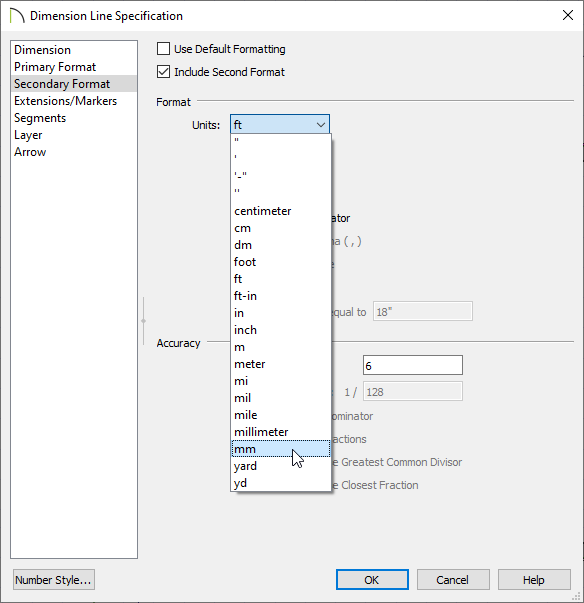
- Uncheck Use Default Formatting.
- Check Include Second Format.
- Use the Units drop-down under the Format section to select a unit of your choice.
- Uncheck Trailing Zeros and specify the desired Accuracy.
- Click OK to confirm the changes and close the dialog.
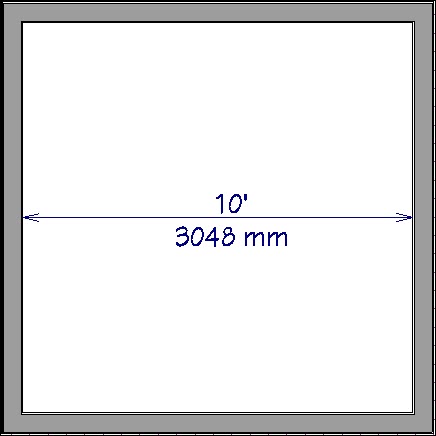
- You can now see that you have modified the dimension so that it displays both metric and imperial units.
To change your dimension defaults
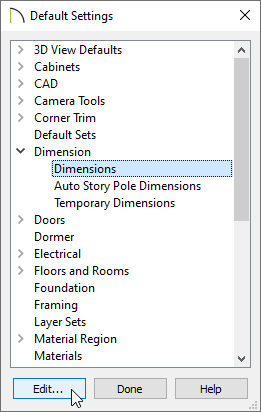
- To change your dimension defaults so that both units of measurement are displayed, select Edit> Default Settings
 , expand the Dimension category, select Dimensions from the list, then click Edit.
- In the Saved Dimension Defaults dialog, select an Available Dimension Default that you would like to customize, then click Edit once again.
- On the Secondary Format panel of the Dimension Defaults dialog that displays next, check Include Second Format and specify your desired settings.
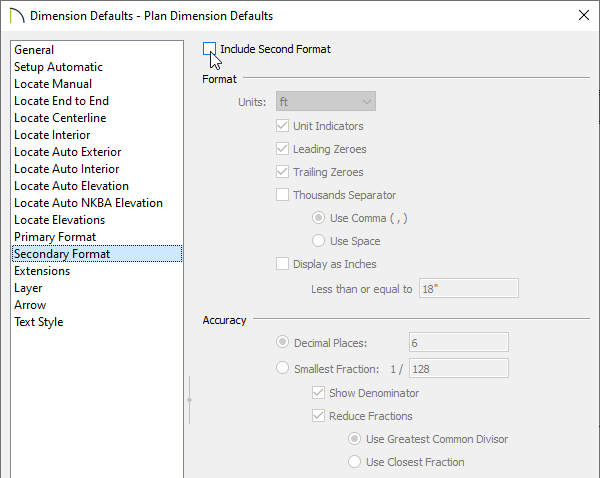
- Once your desired changes have been made, click OK and/or Done on each of the dialog boxes.
