Chief Architect Help Database - Article Number:  687

How to Show the Room Area and Room Dimensions at the Same Time

The information in this article applies to:

  • Chief Architect X5
  • Chief Architect X4
  • Chief Architect X3
  • Chief Architect X2
  • Chief Architect X1
QUESTION

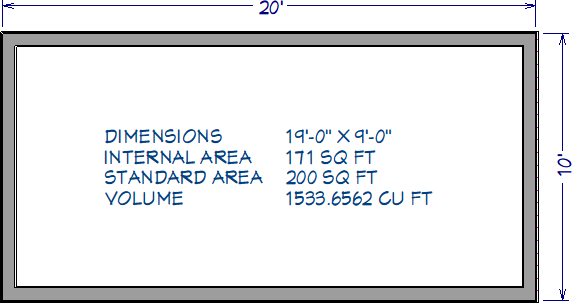
I would like to see the room area and the room dimensions at the same time. How can this be done?

ANSWER

You can display more information about a room by using the Text tools, including text macros.
 

To create a text item that will show more information about the room it is in

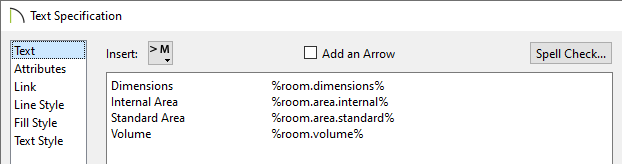
  1. Select CAD> Text> Text  tnd click in a room that you wish to display the area for to open the Text Specification dialog.


  2. Click the arrow button beside Insert> to display a list of macros, which are formulas that enter information into your text object automatically.
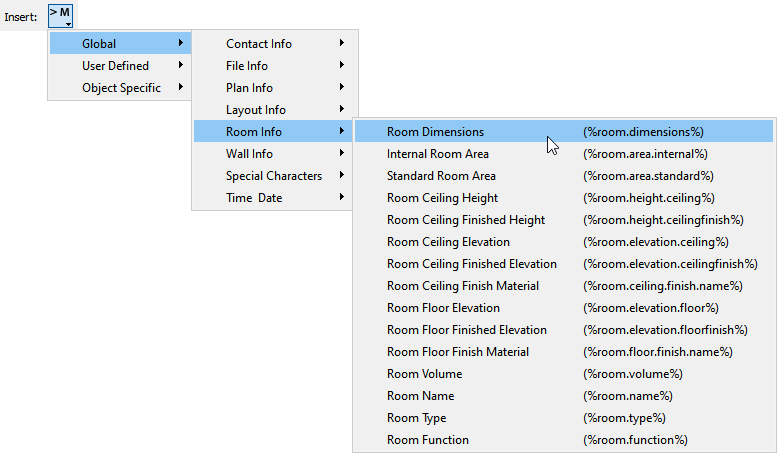

  3. From this menu, select each of the following macros related to room size:

    • %room.area.internal

    • %room.area.standard

    • %room.dimensions


  4. Insert a few spaces between each macro so that they can be clearly distinguished in the text object, and click the OK button to close the dialog and display the new text object in floor plan view.


  5. Decide which macro best fits your needs and, with the text object selected, click the Open Object  edit button to reopen the Text Specification dialog.


  6. Delete the macros you do not wish to keep; add text such as the room's name or a brief description; and click the OK button to close the dialog once again.


Note: If you move this text item to a different room, it will display information about the room it was moved to rather than the room it was created in. If you move the text item outside the building, it will display information about the entire building

Last updated on: Mar 29, 2013


The Chief Architect support team has compiled a list of articles with common questions and answers.


Find answers on ChiefTalk

Answers to many how-to and technical questions can be found 24 hours a day, 7 days a week on our online forum, www.ChiefTalk.com. ChiefTalk is visited not only by our software users, but also by members of our training, support, and engineering teams who are well-versed in using the software and are happy to help you. On ChiefTalk, you can discover tools and techniques to bring your design ideas to life.