I would like to be able to send my projects (consisting of plans and or layout files) back and forth between myself and someone else who is using a different Chief Architect product, such as Home Designer. How can I send them a file that they can open and modify in their product?
If a Chief Architect user wants to send a Home Designer user a file, the same versions of each product will need to be used. You can use the information listed below to check version compatibility:
Keep in mind that, as a Chief Architect user, you can open a file created in an earlier version of a Home Designer program and you will be able to open and modify the file. However, if you send it back to someone using a prior Home Designer version, they will not be able to reopen the file in their version.
For example, if the Home Designer person is using a Home Designer 2026 program, and you are using Chief Architect X18, then they will be able to send you their file, which you can open, modify and save, but they will not be able to reopen the file unless they upgrade to Home Designer 2027.
If you are using the current version of Chief Architect, but your client is using an older Home Designer version, they will need to upgrade or request the Chief Architect Viewer.
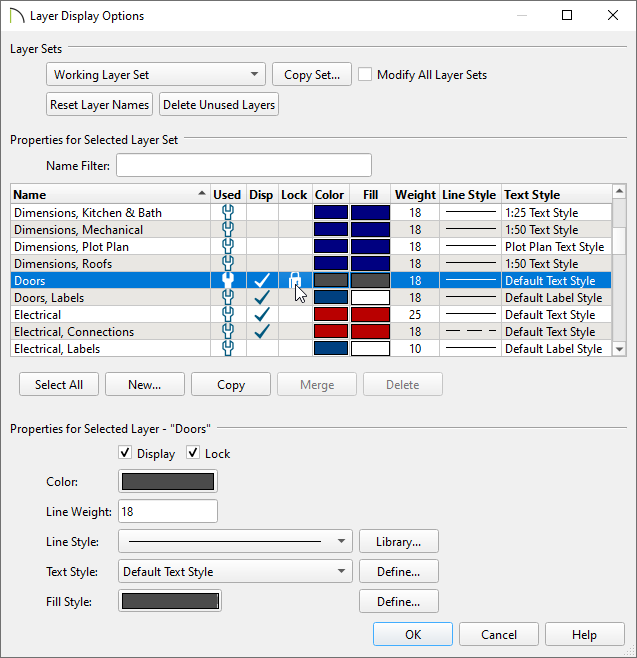
 from the menu and lock any layers you don't want the user to modify, then click OK.
Note: If your client or colleague is using Home Designer 2026 or newer, or Home Designer Pro, they can still unlock/lock layers.
 , and in the Default Settings dialog, click on either Plan or Layout, then click Edit.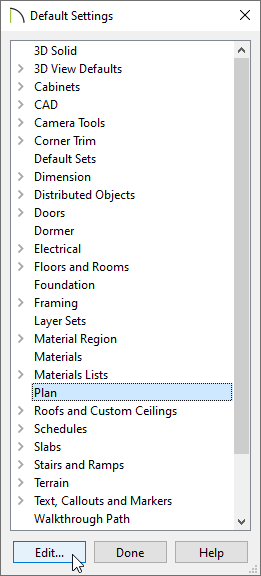
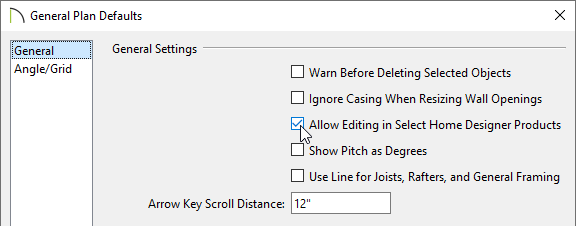
 .
.The editing abilities available to the Home Designer user will be within the limitations of their program. For example, Home Designer products do not have the capability to modify schedules.
 while a plan or layout is open, or right-click on a single project in the Project Browser
  and select Export from the contextual menu. In the dialog that appears next, check/uncheck the files that you would like to include/exclude using the Include File column, then click OK.
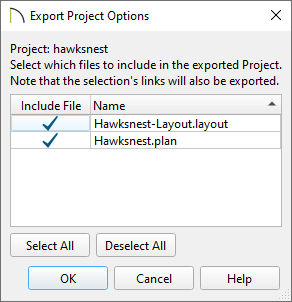 .
. Note: If you use the Export Layout as Project tool while in a layout file, the layout and all plans associated with the layout will be backed up. However, if you use the Export Plan as Project tool while in a plan file, only the plan will be backed up.
 , select the Backup Plan Files and All Referenced Files option, ensure that the Send Backup Files to Zip Archive box is checked, then click OK.
Note: If you use the Backup Entire Layout tool while in a layout file, the layout and all plans associated with the layout will be backed up. However, if you use the Backup Entire Plan tool while in a plan file, only the plan will be backed up.
Additionally, if the "Send Backup Files to Zip Archive" box was not checked, you will need to create a new, empty file folder on the Desktop for the plan and referenced files to be backed up to:

You can now send this project or compressed (zipped) folder to a Home Designer user.
