Saved Plan Views

Saved Plan Views

Video No. 2421

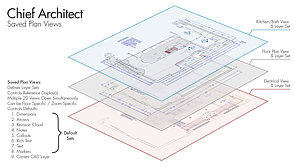
Saved Plan Views allows you to control Layer Sets, Defaults, Default Sets, current CAD Layer and Reference Displays. Using Saved Plan Views allows you to open multiple 2D plan views simultaneously, save the floor and zoom information and control the display of pony walls associated with the view.

Current Playlist: Introductory Class Prep

3:48 How Chief Architect Stores Files

How Chief Architect Stores Files

5:05 User Interface Overview

User Interface Overview

8:41 Drawing and Placing Objects

Drawing and Placing Objects

12:12 Navigating Camera Views

Navigating Camera Views

6:28 Understanding Layers

Understanding Layers

6:18 Understanding Layer Sets

Understanding Layer Sets

15:17 Saved Plan Views

Saved Plan Views

28:23 Schedules Overview

Schedules Overview

14:54 Default Settings Summary

Default Settings Summary

5:03 Setting Preferences

Setting Preferences

8:33 Library Browser Overview

Library Browser Overview

9:05 Utilizing the Project Browser

Utilizing the Project Browser

30:54 Creating Layouts and Construction Documents

Creating Layouts and Construction Documents

3:20 Printing & Saving a PDF

Printing & Saving a PDF

Related Videos

Library & Project Browsers


Saved Plan Views, Layers & Annotations