 By
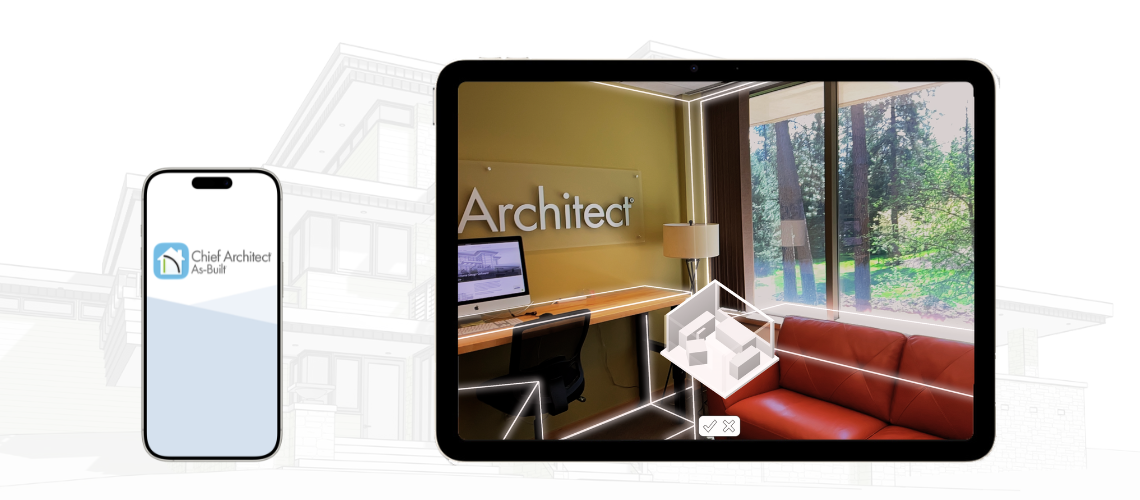
By Creating an accurate as-built floor plan can be a time consuming step in a remodeling project. The Chief Architect As-Built mobile app available for LiDAR equipped iPhones and iPads helps make this process fast, efficient, and accurate. Using room-scanning technology, the app detects structural elements (walls, windows, and doors) and generates the as-built floor plan and 3D model of the spaces, which can be seamlessly imported into our desktop app Chief Architect Premier.
- Key Features
- How will Chief Architect As-Built help my business?
- Chief Architect As-Built Tips
- Supported Devices
Key Features
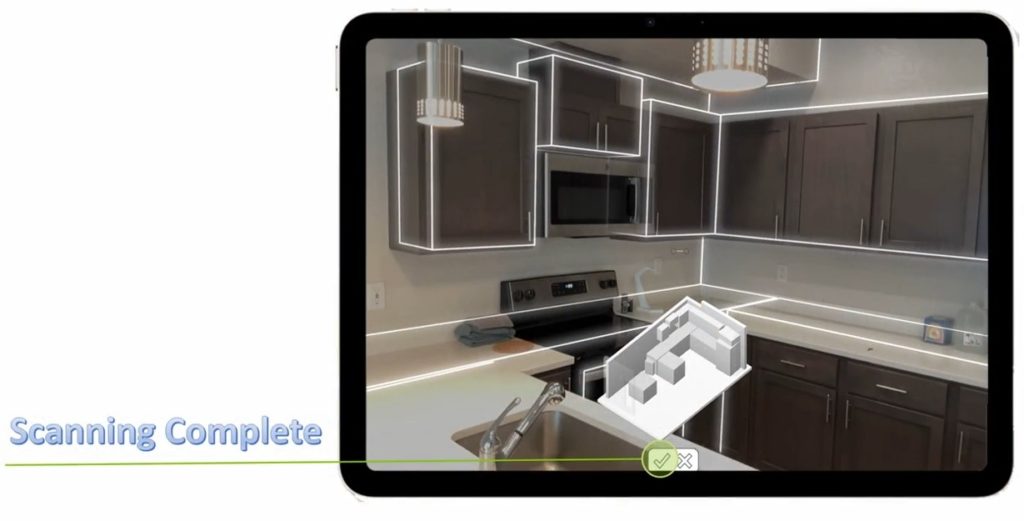
- Automatic Floor Plans and 3D Models: Simply walk through and “film” a room and the app instantly generates a 2D as-built floor plan and 3D model of the space.
- Automatic Precise Measurements: The app automatically measures interior spaces and accurately places walls, doors and windows without needing to take a manual measurement.
- In-App Editing: Chief Architect As-Built is the only as-built measurement app that allows in-app editing. Key measurements can be verified and edited on site if required.
- Annotations: Embed text notes, room names, dimensions strings and arrows to add context and information about the project.
- Export to Chief Architect Premier: Seamlessly import as-built floor plans created in the mobile app into our desktop app Chief Architect Premier to begin designing the remodeled space.
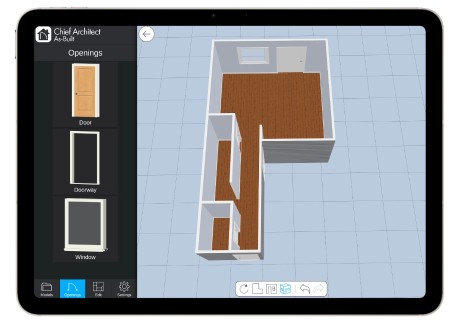
View and edit room scans in 3D
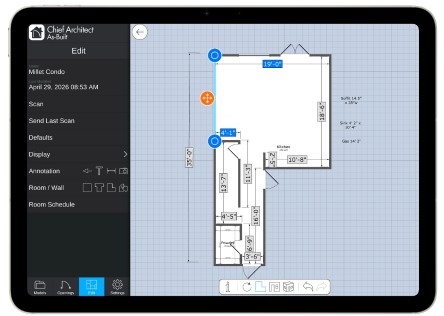
Use 2D plan views to add precision to key measurements
How will Chief Architect As-Built help my business?
For a remodeling business, documenting an existing space has traditionally been done by taking measurements with a tape measure or laser measure and sketching it out with pencil and paper. This manual process is time consuming, prone to human error, and requires the sketch to be manually redrawn in design software; another step where mistakes can be introduced.
The Chief Architect As-Built mobile app transforms this workflow into an efficient, high-speed digital process. The app captures measurements digitally, significantly reducing the time required for site documentation. It creates a precise as-built floor plan and 3D model that serves as a reliable source of information about the existing space.
The as-built plan then seamlessly uploads to the cloud and is instantly available to office staff to import into Chief Architect Premier to design the remodeled space for the client.
Benefits
- Increased Accuracy and Precision: LiDAR technology used in the app provides inch-level accuracy, significantly reducing human error compared to taking manual tape measurements. This precision is critical for capturing exact as-built conditions in complex renovation projects. In addition, Chief Architect As-Built allows you to verify and edit critical measurements with a Bluetooth laser measure for even greater accuracy. Edits of the scan can be made while on-site, in real-time – a key feature missing in other room scanning apps.
- Faster Site Documentation: A home that once took hours to manually measure can be scanned in minutes, enabling teams to get usable data sooner for designing and estimating. Clients can even scan the space themselves and send the scan to you, potentially eliminating the need to visit the job site.
- Streamlined workflow: The Chief Architect As-Built mobile app allows you to instantly send scanned spaces directly into our desktop app Chief Architect Premier. This provides instant access to the as-built plan to design the remodeled space, improving productivity and keeping projects moving forward.
Chief Architect As-Built Tips
Prepare the Space:
- Turn on lights
- When possible, move objects away from walls, doors, and windows
- Minimize room clutter
- Ensure there is a clear walking path throughout the space
- Move curtains away from doors and windows or flip them over the rod
- Close window blinds
- Flip shower curtains over the rod or open fully
- Turn off stationary moving objects (fireplaces, televisions, ceiling fans, etc.)
- Prevent moving objects from entering the scan (people, pets, robot vacuums, etc.)
- Close doors when possible
Active Scanning:
- Start in a clear corner of the room. Move your device up, down, left, and right until the room corner and ceiling become recognized.
- As you scan, slowly move your mobile device and keep it pointed at edges/corners of the room, windows, and doors as much as possible.
- Avoid direct sunlight.
- Avoid scanning over an empty wall, ceiling, or floor with no edges or other objects.
- Avoid scanning reflective surfaces (mirrors, televisions, stainless steel appliances, etc.).
- Avoid scanning over accessory, square-shaped objects (televisions, art, etc.).
- Save each floor level as a separate file.
Post Scanning:
- Assign room names.
- Add text notes as needed.
- Verify measurements for key areas using a Bluetooth laser measurer or tape measure and manually adjust as needed.
- Adjust wall widths as needed. Note that if wall widths change, room sizes may need to be manually adjusted.
Importing into Chief Architect Premier:
- Start a new Project using your desired template.
- If importing multiple floor levels, import the first floor first. For additional floor levels, build blank new floor levels and then import the additional scanned floor levels.
- When ready to design the newly remodeled space for the client, Make a Copy of the plan so that you have an “As-Built” version and a “Remodel” version of the plan. In the Remodel version proceed with designing the final space for the client.
Supported Devices
The Chief As-Built app requires an Apple device with a LiDAR sensor. We recommend using an iPad due to the large screen size. Importing the As-Built scan requires Chief Architect Premier X18.
Download Today!
The Chief Architect As-Built app is a powerful tool for remodeling projects, making it fast and easy to capture accurate as-built measurements of an existing space and seamlessly import them into Chief Architect Premier to continue the design process. The app is compatible with LiDAR-equipped Apple devices and can be downloaded for free from the Apple app store.
Additional Resources
- Chief Architect As-Built App Product Page
- Transferring and Sharing Chief Architect As-Built Models
- Apple Devices Compatible with Chief Architect As-Built
- Using a Bluetooth Laser Measuring Device with Chief Architect As-Built
- Chief As-Built App for Remodeling Plans & Measurements Webinar